ROCoding #3: Ellipses and rings
The previous post in this series covered circular or radial blends and gradients. With a few simple modifications the code can be adapted to create elliptical and annular fills. Or eggs and doughnuts, if you prefer 😉.
Again, all these examples will be using various procedures from the previous posts.
RISC OS provides some graphics primitives to draw ellipses, and from BASIC this is:
ELLIPSE [FILL] centreX,centreY, width,height [, angle]
We won’t be using this however, and we won’t be including the angle setting, which draws a rotated ellipse. Let’s not make it too complicated…
Elliptical gradients
First we add some lines to PROCinit to set up some gradients to use (g%() will be used for generated blends):
DIM bow%(256),plasma%(256),g%(256)
nbow%=FNload_palette_file(”Palettes:bow2/pal”,bow%())
nplasma%=FNload_palette_file(”Palettes:Plasma/pal”,plasma%())
ng%=256
Our new procedure is PROCelliptical_gradient. The arguments are similar to PROCradial_gradient, with the addition of ecc, which is a measure of eccentricity. The horizontal radius is given by rad%, and the vertical radius is rad% multiplied by ecc. So positive values below 1.0 will squash it vertically, while values greater than 1.0 will give a tall ellipse. An ecc value of 1.0 will, of course, be the same as calling PROCradial_gradient.
DEF PROCelliptical_gradient(x%,y%,rad%,ecc,ncols%,gradient%(),flags%)
LOCAL vduvars%,c%(),radp%,s,i,os1%,X%,Y%,Y2%,d%
radp%=rad%>>xeig%
DIM vduvars% LOCAL 24, c%(radp%)
vduvars%!0=136: vduvars%!4=137:vduvars%!8=-1
SYS ”OS_ReadVduVariables”,vduvars%,vduvars%
VDU 29,x%;y%;
i=ncols%/radp%
IF flags% AND 2: s=ncols%-1: i=-i
FOR X%=0 TO radp%-1: c%(X%)=gradient%(s): s+=i: NEXT
os1%=1<<xeig%
FOR Y%=0 TO rad%*ecc-os1% STEP os1%
  Y2%=Y%/ecc*Y%/ecc
  FOR X%=0 TO rad%-os1% STEP os1%
    d%=SQR(Y2%+X%*X%)
    IF d%<(rad%-1) THEN
      SYS CT_SetGCOL%,c%(d%>>xeig%)
      POINT X%,Y%: POINT -X%,Y%: POINT -X%,-Y%: POINT X%,-Y%
    ENDIF
  NEXT
NEXT
VDU 29,vduvars%!0;vduvars%!4;
ENDPROC
The code is fairly similar, apart from the first lines of the Y% loop. We scale the vertical pixel loop (Y%) by ecc, and then the Y%-squared value — Y2% — is rescaled so it becomes, in effect, the Y value of a circular blend. Which is then used to get the colour.
Note that this procedure isn’t very robust, and would benefit from some error checking — for example, the ecc value should be checked it’s greater than zero.
 |
PROCinit PROCelliptical_gradient(128,128, 128, 0.3, nbow%, bow%(),0) PROCelliptical_gradient(48,128, 32, 4.0, nbow%, bow%(),2) PROCmake_blend(yellow%,red%,ng%,g%()) PROCelliptical_gradient(208,128, 32, 2.5, ng%, g%(),0) |
This draws two rainbow-filled ellipses with eccentricities of 0.3 (the wide one) and 4.0 (the tall one, with the palette inverted), and a blend between yellow and red.
 |
To finish, here’s a collection of 20 random ellipses with random colour blends: PROCinit FOR i%=1 TO 20 PROCmake_blend(RND,RND,ng%,g%()) xc%=RND(780)+10: yc%=RND(780)+10 r%=RND(100)+50: e=RND(100)/40+0.1 PROCelliptical_gradient(xc%,yc%, r%, e, ng%,g%(),0) NEXT |
Annular gradients
An annulus is a ring. As an aside, an annular eclipse is when the Moon appears slightly smaller than the Sun — caused by the lunar orbit being an ellipse, with varying distance from the Earth — and hence the eclipse appears as a ‘ring of fire’.
To create a ring, we provide inner and outer radii to our procedure in the parameters irad% and orad%. If the inner radius is zero, it will act like PROCradial_gradient.
Here’s the code:
DEF PROCannular_gradient(x%,y%,irad%,orad%,ncols%,gradient%(),flags%)
LOCAL vduvars%,c%(),radp%,s,i,os1%,X%,Y%,Y2%,d%
IF irad%>orad% SWAP irad%,orad%
IF (orad%-irad%)<8 ERROR 100, ”Inner and outer radius too similar”
radp%=(orad%-irad%)>>xeig%
DIM vduvars% LOCAL 24, c%(radp%)
vduvars%!0=136: vduvars%!4=137:vduvars%!8=-1
SYS ”OS_ReadVduVariables”,vduvars%,vduvars%
VDU 29,x%;y%;
i=ncols%/radp%
IF flags% AND 2: s=ncols%-1: i=-i
FOR X%=0 TO radp%-1: c%(X%)=gradient%(s): s+=i: NEXT
os1%=1<<xeig%
FOR Y%=0 TO orad%-os1% STEP os1%
  Y2%=Y%*Y%
  FOR X%=0 TO orad%-os1% STEP os1%
    d%=SQR(Y2%+X%*X%)
    IF d%>=irad% AND d%<(orad%-1) THEN
      SYS CT_SetGCOL%,c%((d%-irad%)>>xeig%)
      POINT X%,Y%: POINT -X%,Y%: POINT -X%,-Y%: POINT X%,-Y%
    ENDIF
  NEXT
NEXT
VDU 29,vduvars%!0;vduvars%!4;
ENDPROC
The main difference in the code is checking that d% is between the two radii before drawing anything. The procedure has some rudimentary error checking, to ensure that the ring isn’t unfeasibly thin. I’m also swapping them if they’re in the wrong order. To demonstrate:
 |
PROCinit PROCannular_gradient(400,400, 300,400, nbow%,bow%(),0) PROCmake_blend(green%,blue%,ng%,g%()) PROCannular_gradient(400,100, 100,280, ng%,g%(),0)  This is the rainbow gradient displayed in a ring with inner radius 300 and outer radius 400. Overlaid is a blend between green and blue with radii 100 and 280. Incidentally, you’ll notice from the picture on the right that the rainbow gradient is wrong — a real rainbow has red on the outside of the primary bow (the secondary, fainter one, is the other way round). Easy enough to change by setting flags% to %10. |
Dwarf Mini and RISC OS

The Dwarf Mini is an ultra-portable “smart telescope”, suitable for photographing deep-sky objects like nebulae and galaxies. It can also be used to image the sun and moon, but isn’t suitable for planetary imaging as the magnification is too small. It’s also useful for terrestrial imaging.
There is no eyepiece — you don’t look through it — and all operations are controlled via a tablet or smartphone, in our case a Pixel 6a. It’s motorised and can track astronomical objects automatically, either by just plonking it down on a flat surface or, for more accuracy in longer exposures, setting up an equatorial mount: just attach it to a tripod and align the scope to the pole star. There are built-in filters for deep-sky objects, a magnetically attached solar filter, and the device can take many images and stack them to increase the quality.
There are two cameras, wide-field and telephoto. The scope communicates with your phone using NFC, Bluetooth or wifi, giving a live display. The wifi can connect over your home LAN or directly, using its own server. All operations are controlled remotely, so (given adequate wifi range) you can do an observing session from inside your own home — a distinct advantage on cold winter nights. There’s a built-in comprehensive sky atlas and the app has a help system, and there’s a full manual online, also available as a PDF.
An example

So what do the images look like? We’ve had terrible weather recently, but today was our first clear day for ages. And here’s the sun at 8:30 this morning.
There are three small sunspots visible, confirmed via the SpaceWeather site. It’s a stack of 20 photos, each with 1/200sec exposure. Tracking was perfect — all I needed to do was point it at the sun and the rest was automatic.

And just to show it can do more, here are some starlings, photographed a few hours later. All shots were taken through an open window.
Accessing the files
While the phone is connected to the Mini, you can download the final stacked image to your phone as a standard JPEG, and then transfer it to your NAS or computer for perusal and editing. But to access the full uncompressed data — which consists of a number of raw images in FITS or TIFF format along with shooting data, calibration images and a PNG file of the stacked result — you need a different connection.
The manual for the scope claims that you can access the full images via a USB C-C cable, also used for charging the scope’s battery. But I’ve not been able to get that to work with any of our devices/computers — for example, if we plug the scope into our phone using the supplied cable it just starts charging the scope’s battery from the phone. I’m not alone in this; a number of other users report the same problem.
Fortunately, the Dwarf Mini has a built-in wifi server, and this method works perfectly, giving access to the full data over FTP. And RISC OS will happily connect to it so you can download images:

- Power on the Dwarf Mini
- Wait until the Mini’s indicator is a circling green light
- On RISC OS, select the device from wifi networks
- Enter the wifi password (the default is in the manual)
- Wait until the iconbar connection icon is green
- Now you can use FTPc to connect:
Host: 192.168.88.1
Security: 0 - None…
Passive: On
Add this connection to FTPc’s user menu with an appropriate name. For reference, I’m using a 4te2 running RISC OS 5.31.
Once you’re connected, you should see see a filer-like display, as right. You can navigate this like a filer window and copy files by drag-and-drop.
Note that my main internet connection is via an ethernet cable. This operates concurrently with the wifi, so I’m able to copy files straight over to our NAS. Also note that if the scope isn’t connected to a phone, it will power down after 10 minutes or so — the ftp connection does not override this.
The Astronomy directory will contain a number of subdirectories containing the actual data. The names of these contain useful information — for instance, the data for the sun picture above is inside:
DWARF_RAW_TELE_Sun_EXP_0.005_GAIN_10_2026-02-14-08-36-33-624
This tells you which lens was used (TELE), the target (Sun), the exposure times (0.005sec), the gain used (10 — this is roughly like the ISO setting in a camera), and the date and time (YYYY-MM-DD-hh-mm-ss-mss). It’s unfortunate that FTPc’s display can’t be made wider; you have to navigate the menu to Info to see the full name.
Inside the directory there’ll be a number of files like this:
Sun_0.005s10_Astro_20260214-083640954_25C.fits
…which is a FITS file. Again, there’s useful information here: the target (Sun), exposure time (0.005sec), the gain (10), the internal filter in use (Astro), and the date and time (YYYYMMDD-hhmmssmss). And lastly, 25C is the sensor temperature.
There’ll also be a file called shotsinfo.json, which can be opened as a text file:
{
    ”DEC”: 0.0,
    ”RA”: 0.0,
    ”binning”: ”1*1”,
    ”exp”: ”1/200”,
    ”format”: ”FITS”,
    ”gain”: 10,
    ”ir”: ”Astro”,
    ”maxTemp”: 25,
    ”minTemp”: 25,
    ”shotsStacked”: 20,
    ”shotsTaken”: 20,
    ”shotsToTake”: 20,
    ”target”: ”Sun”
}
DEC and RA are the celestial coordinates of the target. For the sun and moon this is not set, as the device tracks the target using the image itself, rather than knowing its position in the sky. For other objects, when you request a target the scope will analyse the star pattern it sees, and work out exactly where in the sky it’s pointing — an impressive process known as plate solving. The scope can then slew to the target’s position.
The stacked.jpg file is the one you can access on the phone, and there are also stacked versions as a 16-bit png and a 16-bit FITS file.
If you look at one of the FITS files in a text editor (double-click and hold), there’s a header like this:
SIMPLE  =                    T / file does conform to FITS standard
BITPIX  =                   16 / number of bits per data pixel
NAXIS   =                    2 / number of data axes
NAXIS1  =                 1280 / length of data axis 1
NAXIS2  =                  720 / length of data axis 2
EXTEND  =                    T / FITS dataset may contain extensions
BZERO   =                32768 / offset data range to that of unsigned short
BSCALE  =                    1 / default scaling factor
DATE-OBS= ’2026-02-14T08:36:40.944′ / Time end of exposure
EXPTIME =                0.005 / [s] Exposure Time
GAIN    =                   10 / Gain
RESTACK =                    0 / is Mega Stack
XBINNING=                    1 / binning factor used on X axis
YBINNING=                    1 / binning factor used on Y axis
FILTER  = ’Astro   ’           / selected filter
CAMERA  = ’TELE    ’           / shooting camera
XPIXSZ  =                  2.9 / [um] pixel size in microns (with binning)
YPIXSZ  =                  2.9 / [um] pixel size in microns (with binning)
FOCALLEN=                 150. / [mm] Focal length of telescope in mm
DET-TEMP=                   25 / Detector temperature in C
RA      =                   0. / [deg] Observe object RA coordinate (J2000)
DEC     =                   0. / [deg] Observe object DEC coordinate (J2000)
OBJECT  = ’Sun     ’           / Observe object
BAYERPAT= ’RGGB    ’           / Bayer pattern
EQMODE  =                    0 / Equatorial mode
FIRMWARE= ’1.0.22.1′           / telescope firmware version
MACADDR = ’xxxxxxxxxxxx’       / telescope MAC address
TELESCOP= ’DWARF mini’         / DWARFLAB telescope
INSTRUME= ’DWARF mini’         / DWARFLAB instrument
ORIGIN  = ’DWARFLAB’           / DWARFLAB TEAM
END
Solar and lunar photography has a resolution of 1280×720, while everything else is 1920×1080. The raw data is 16-bit graphics — just to be clear, that’s 16-bits per channel. And here’s where RISC OS will have problems: there is little software that can process 16-bit graphics files.
PhotoDesk will load the 16-bit PNG. I haven’t played around much, but on a star field image, the Increase contrast setting of Image processing>Gamma does a good job of reducing colour noise.
ChangeFSI can sort-of handle FITS files. But with limitations: you’re losing data (and low-level light data is very important in astronomical imaging), and you’ll get a greenish tinge which needs to be processed out. This is due to the RGGB Bayer pattern of the detector, which is quite standard.
I’ll be investigating this further, and will report on results here. Let’s hope for … clear skies! Which we had briefly last night, enough to get a first attempt at a random star field:

Well, I say random — it’s actually centred on the star HIP 80364, which, if you google it, turns out to be a star in the game Elite: Dangerous. So, a RISC OS connection…
ROCoding #2: Circles
The first post in this series covered filling a rectangle with blends and gradients. This time we’ll look at generating circular or radial blends and gradients, which is a bit more complicated. All these examples will be using various procedures from the previous post.
RISC OS provides graphics primitives to draw outline and filled circles. From BASIC:
 |
PROCinit SYS CT_SetGCOL%,&40dd4000 CIRCLE 64,192,60 CIRCLE FILL 192,64,60 |
The parameters are the centre coordinates and the radius, in OS units. As an aside, here’s the additive RGB triplet as used in the PhotoDesk manual, showing the complementary cyan, magenta and yellow colours. The circles are blended with the OR operation:
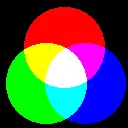 |
PROCinit SYS CT_SetGCOL%,red% CIRCLE FILL 128,160,80 SYS CT_SetGCOL%,blue%,,,,1 CIRCLE FILL 170,88,80 SYS CT_SetGCOL%,green%,,,,1 CIRCLE FILL 92,88,80 |
So, can we use these primitives to create a radial blend? Here’s a first attempt:
[Read more…]