ROCoding #2: Circles
The first post in this series covered filling a rectangle with blends and gradients. This time we’ll look at generating circular or radial blends and gradients, which is a bit more complicated. All these examples will be using various procedures from the previous post.
RISC OS provides graphics primitives to draw outline and filled circles. From BASIC:
 |
PROCinit SYS CT_SetGCOL%,&40dd4000 CIRCLE 64,192,60 CIRCLE FILL 192,64,60 |
The parameters are the centre coordinates and the radius, in OS units. As an aside, here’s the additive RGB triplet as used in the PhotoDesk manual, showing the complementary cyan, magenta and yellow colours. The circles are blended with the OR operation:
 |
PROCinit SYS CT_SetGCOL%,red% CIRCLE FILL 128,160,80 SYS CT_SetGCOL%,blue%,,,,1 CIRCLE FILL 170,88,80 SYS CT_SetGCOL%,green%,,,,1 CIRCLE FILL 92,88,80 |
So, can we use these primitives to create a radial blend? Here’s a first attempt:
DEF PROCcirc1(x%,y%,rad%,startcol%,endcol%)
LOCAL n%,s%,r,g,b,rs,gs,bs
s%=1<<xeig%
PROCblend_steps(endcol%,startcol%,rad%>>xeig%,r,g,b,rs,gs,bs)
FOR n% = 1 TO rad%>>xeig%
 GCOL r,g,b
 CIRCLE x%,y%, rad%
 rad%-=s%
 r+=rs: g+=gs: b+=bs
NEXT
ENDPROC
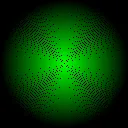
We’re using encoded colours, with startcol% at the centre. We’re drawing outline circles from the outside in, so we swap the colours to create the blend steps, the number of which is the radius in pixels (note that all these examples assume square pixels, where xeig% and yeig% are identical; RISC OS supports non-square pixels, but including that would complicate things unnecessarily for our purposes here). This will give us:
 |
PROCinit PROCcirc1(128,128,128,green%,black%) |
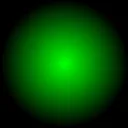
This nearly works, but there are pixels left uncoloured because the consecutive circle outlines will occasionally ’skip over’ a particular coordinate (and other pixels will be coloured in twice). If we change PROCcirc1 to use CIRCLE FILL x%,y%, rad% we get this:
 |
PROCinit PROCcirc1fill(128,128,128,green%,black%) |
This is better, but if you look carefully and zoom in you can see there are still discontinuities in the shading. And it’s very inefficient, drawing a vast number of pixels for each circle.
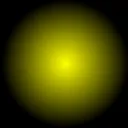
Another way to improve things would be to do the circle outlines twice, offsetting the centre of the second call by a single pixel. And let’s try a different colour:
 |
PROCinit PROCcirc1(128,128,128,yellow%,black%) PROCcirc1(128+(1<<xeig%),128,128,yellow%,black%) |
This is more efficient. But again, zooming in reveals discontinuities and it isn’t guaranteed to work for large circles. And precision is lost because we’re moving the centre point for the second set of circles.
Both of these ‘fixes’ will also cause problems if you want to include GCOL action codes — they just won’t work properly as each pixel is painted multiple times.
Radial gradients, done better
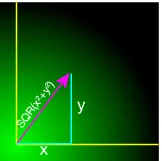
The above methods will work for a quick-and-dirty radial fill, but to do it properly the area (which is a square with sides 2xradius) has to be scanned on a pixel-by-pixel basis. For each pixel in the area simple geometry will give us the colour of the pixel at that point — see right. We set the graphics origin to the centre of the fill, to make things a bit easier. A radial fill is completely symmetric, so we only need to do this calculation for one quadrant; the other three can be filled in by negating the x and y coordinates.
We’ll go straight to the more general gradient method, rather than using a simple blend between two colours. Like the rectangle gradient procedure we accept a gradient%() vector containing ncols% encoded colours, and an extra flags% parameter for miscellaneous settings.
An important principle in programming is that a function should have no side-effects — in this case, changing the graphics origin. So the first thing to do is save the old graphics origin, and restore it when we’re done. RISC OS gives access to this with the OS_ReadVduVariables system call, and we store the old values in a temporary memory block, set up with DIM vduvars% LOCAL 24. Note that allocating temporary memory blocks in this fashion needs BASIC 1.34 or later.
DEF PROCradial_gradient(x%,y%,rad%,ncols%,gradient%(),flags%)
LOCAL vduvars%
DIM vduvars% LOCAL 24
vduvars%!0=136: vduvars%!4=137:vduvars%!8=-1
SYS ”OS_ReadVduVariables”,vduvars%,vduvars%
VDU 29,x%;y%;
REM More code …
VDU 29,vduvars%!0;vduvars%!4;
ENDPROC
As we’re processing each pixel inside nested loops, it makes sense to take as much calculation as possible outside of the inner loop. So the next step is to generate a vector of colours c%() for each possible distance from the centre, by scaling the gradient%() vector to fill c%(). As in the rectangle fill, setting bit 1 of flags% inverts the gradient:
DEF PROCradial_gradient(x%,y%,rad%,ncols%,gradient%(),flags%)
LOCAL vduvars%,c%(),radp%,s,i
radp%=rad%>>xeig%: REM The radius in pixels
DIM vduvars% LOCAL 24, c%(radp%)
vduvars%!0=136: vduvars%!4=137:vduvars%!8=-1
SYS ”OS_ReadVduVariables”,vduvars%,vduvars%
VDU 29,x%;y%;
REM Create the colour vector
i=ncols%/radp%
IF flags% AND 2: s=ncols%-1: i=-i: REM Invert the gradient if bit 1 set
FOR X%=0 TO radp%-1
  c%(X%)=gradient%(s)
  s+=i
NEXT
REM More code …
VDU 29,vduvars%!0;vduvars%!4;
ENDPROC
That’s the setup done, and now we iterate over over every pixel in the quadrant. Defining Y2% as Y%*Y% avoids unnecessary multiplications in the inner loop, where we paint the pixels if the point is inside the circle. So here’s a first effort at a radial gradient procedure:
DEF PROCradial_gradient(x%,y%,rad%,ncols%,gradient%(),flags%)
LOCAL vduvars%,c%(),radp%,s,i,os1%,X%,Y%,Y2%,d%
radp%=rad%>>xeig%
DIM vduvars% LOCAL 24, c%(radp%)
vduvars%!0=136: vduvars%!4=137:vduvars%!8=-1
SYS ”OS_ReadVduVariables”,vduvars%,vduvars%
VDU 29,x%;y%;
i=ncols%/radp%
IF flags% AND 2: s=ncols%-1: i=-i
FOR X%=0 TO radp%-1: c%(X%)=gradient%(s): s+=i: NEXT
os1%=1<<xeig%
FOR Y%=0 TO rad%-os1% STEP os1%
  Y2%=Y%*Y%
  FOR X%=0 TO rad%-os1% STEP os1%
    d%=SQR(Y2%+X%*X%)
    IF d%<rad% THEN
      SYS CT_SetGCOL%,c%(d%>>xeig%)
      POINT X%,Y%: POINT -X%,Y%: POINT -X%,-Y%: POINT X%,-Y%
    ENDIF
  NEXT
NEXT
VDU 29,vduvars%!0;vduvars%!4;
ENDPROC
Now we can actually try drawing something. This is the Plasma palette from the GIMP (imported using Gradgrind), with an overlaid rainbow:
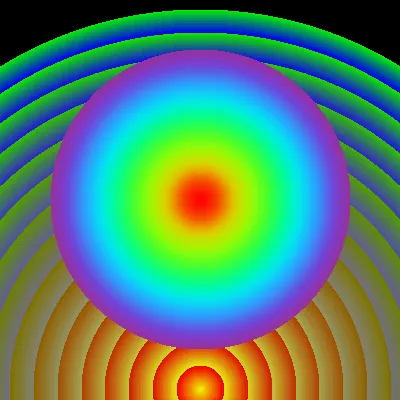 |
PROCinit DIM g%(256), bow%(256) gcols%=FNload_palette_file(”Palettes:Plasma/pal”,g%()) bowcols%=FNload_palette_file(”Palettes:bow2/pal”,bow%()) PROCradial_gradient(400,20,760,gcols%,g%(),0) PROCradial_gradient(400,400,300,bowcols%,bow%(),%00)  When displayed as a 16×16 swatch grid, the Plasma palette looks like this ———> Like the rectangle fills in the previous post, the radial gradient was originally done to give more interesting backgrounds for the graphs generated by the Solar application. For example, the background to this text is a radial blend between yellow and white; somewhat less lurid than the example at left. Here’s the generating code, with the background cleared to white: GCOL ON 255,255,255: CLG PROCmake_blend(yellow%,white%,256,g%()) PROCradial_gradient(400,400,380,256,g%(),0) |
Where did PROCmake_blend come from? From here:
DEF PROCmake_blend(startcol%,endcol%,ncols%,RETURN g%())
LOCAL i%,r,g,b,rs,gs,bs
PROCblend_steps(startcol%,endcol%,ncols%,r,g,b,rs,gs,bs)
FOR i%=0 TO ncols%-1
  g%(i%)=FNencode_col(r,g,b): r+=rs: g+=gs: b+=bs
NEXT
ENDPROC
This just generates a simple two-colour blend using ncols% colours, and returns it in the vector g%() ready for plugging into PROCradial_gradient.
Summary
Drawing radial gradients using this method is fairly slow, the major bottleneck being the individual pixel addressing (and not, perhaps surprisingly, the SQR operation). One simple improvement would be to replace the multi-line IF…ENDIF in the inner loop with a single line:
IF d%<rad% SYS CT_SetGCOL%,c%(d%>>xeig%): POINT X%,Y%: POINT -X%,Y%: POINT -X%,-Y%: POINT X%,-Y%
But any substantial speed-up would need assembly code and direct access to the display/sprite memory; this would seriously complicate the coding though.
This code also won’t do GCOL actions correctly, as the axis pixels (where x or y are zero) are drawn multiple times. We may fix this in future.
It’s worth noting here that if you want gradient backgrounds for a web page, you don’t need to generate images — CSS provides extensive and flexible ways to create them. I’ve used this facility to mark the current and previous year values in our solar panel page. Of course, the browser needs to support this — NetSurf doesn’t, unfortunately.