ROCoding #3: Ellipses and rings
The previous post in this series covered circular or radial blends and gradients. With a few simple modifications the code can be adapted to create elliptical and annular fills. Or eggs and doughnuts, if you prefer 😉.
Again, all these examples will be using various procedures from the previous posts.
RISC OS provides some graphics primitives to draw ellipses, and from BASIC this is:
ELLIPSE [FILL] centreX,centreY, width,height [, angle]
We won’t be using this however, and we won’t be including the angle setting, which draws a rotated ellipse. Let’s not make it too complicated…
Elliptical gradients
First we add some lines to PROCinit to set up some gradients to use (g%() will be used for generated blends):
DIM bow%(256),plasma%(256),g%(256)
nbow%=FNload_palette_file(”Palettes:bow2/pal”,bow%())
nplasma%=FNload_palette_file(”Palettes:Plasma/pal”,plasma%())
ng%=256
Our new procedure is PROCelliptical_gradient. The arguments are similar to PROCradial_gradient, with the addition of ecc, which is a measure of eccentricity. The horizontal radius is given by rad%, and the vertical radius is rad% multiplied by ecc. So positive values below 1.0 will squash it vertically, while values greater than 1.0 will give a tall ellipse. An ecc value of 1.0 will, of course, be the same as calling PROCradial_gradient.
DEF PROCelliptical_gradient(x%,y%,rad%,ecc,ncols%,gradient%(),flags%)
LOCAL vduvars%,c%(),radp%,s,i,os1%,X%,Y%,Y2%,d%
radp%=rad%>>xeig%
DIM vduvars% LOCAL 24, c%(radp%)
vduvars%!0=136: vduvars%!4=137:vduvars%!8=-1
SYS ”OS_ReadVduVariables”,vduvars%,vduvars%
VDU 29,x%;y%;
i=ncols%/radp%
IF flags% AND 2: s=ncols%-1: i=-i
FOR X%=0 TO radp%-1: c%(X%)=gradient%(s): s+=i: NEXT
os1%=1<<xeig%
FOR Y%=0 TO rad%*ecc-os1% STEP os1%
  Y2%=Y%/ecc*Y%/ecc
  FOR X%=0 TO rad%-os1% STEP os1%
    d%=SQR(Y2%+X%*X%)
    IF d%<(rad%-1) THEN
      SYS CT_SetGCOL%,c%(d%>>xeig%)
      POINT X%,Y%: POINT -X%,Y%: POINT -X%,-Y%: POINT X%,-Y%
    ENDIF
  NEXT
NEXT
VDU 29,vduvars%!0;vduvars%!4;
ENDPROC
The code is fairly similar, apart from the first lines of the Y% loop. We scale the vertical pixel loop (Y%) by ecc, and then the Y%-squared value — Y2% — is rescaled so it becomes, in effect, the Y value of a circular blend. Which is then used to get the colour.
Note that this procedure isn’t very robust, and would benefit from some error checking — for example, the ecc value should be checked it’s greater than zero.
 |
PROCinit PROCelliptical_gradient(128,128, 128, 0.3, nbow%, bow%(),0) PROCelliptical_gradient(48,128, 32, 4.0, nbow%, bow%(),2) PROCmake_blend(yellow%,red%,ng%,g%()) PROCelliptical_gradient(208,128, 32, 2.5, ng%, g%(),0) |
This draws two rainbow-filled ellipses with eccentricities of 0.3 (the wide one) and 4.0 (the tall one, with the palette inverted), and a blend between yellow and red.
 |
To finish, here’s a collection of 20 random ellipses with random colour blends: PROCinit FOR i%=1 TO 20 PROCmake_blend(RND,RND,ng%,g%()) xc%=RND(780)+10: yc%=RND(780)+10 r%=RND(100)+50: e=RND(100)/40+0.1 PROCelliptical_gradient(xc%,yc%, r%, e, ng%,g%(),0) NEXT |
Annular gradients
An annulus is a ring. As an aside, an annular eclipse is when the Moon appears slightly smaller than the Sun — caused by the lunar orbit being an ellipse, with varying distance from the Earth — and hence the eclipse appears as a ‘ring of fire’.
To create a ring, we provide inner and outer radii to our procedure in the parameters irad% and orad%. If the inner radius is zero, it will act like PROCradial_gradient.
Here’s the code:
DEF PROCannular_gradient(x%,y%,irad%,orad%,ncols%,gradient%(),flags%)
LOCAL vduvars%,c%(),radp%,s,i,os1%,X%,Y%,Y2%,d%
IF irad%>orad% SWAP irad%,orad%
IF (orad%-irad%)<8 ERROR 100, ”Inner and outer radius too similar”
radp%=(orad%-irad%)>>xeig%
DIM vduvars% LOCAL 24, c%(radp%)
vduvars%!0=136: vduvars%!4=137:vduvars%!8=-1
SYS ”OS_ReadVduVariables”,vduvars%,vduvars%
VDU 29,x%;y%;
i=ncols%/radp%
IF flags% AND 2: s=ncols%-1: i=-i
FOR X%=0 TO radp%-1: c%(X%)=gradient%(s): s+=i: NEXT
os1%=1<<xeig%
FOR Y%=0 TO orad%-os1% STEP os1%
  Y2%=Y%*Y%
  FOR X%=0 TO orad%-os1% STEP os1%
    d%=SQR(Y2%+X%*X%)
    IF d%>=irad% AND d%<(orad%-1) THEN
      SYS CT_SetGCOL%,c%((d%-irad%)>>xeig%)
      POINT X%,Y%: POINT -X%,Y%: POINT -X%,-Y%: POINT X%,-Y%
    ENDIF
  NEXT
NEXT
VDU 29,vduvars%!0;vduvars%!4;
ENDPROC
The main difference in the code is checking that d% is between the two radii before drawing anything. The procedure has some rudimentary error checking, to ensure that the ring isn’t unfeasibly thin. I’m also swapping them if they’re in the wrong order. To demonstrate:
 |
PROCinit PROCannular_gradient(400,400, 300,400, nbow%,bow%(),0) PROCmake_blend(green%,blue%,ng%,g%()) PROCannular_gradient(400,100, 100,280, ng%,g%(),0)  This is the rainbow gradient displayed in a ring with inner radius 300 and outer radius 400. Overlaid is a blend between green and blue with radii 100 and 280. Incidentally, you’ll notice from the picture on the right that the rainbow gradient is wrong — a real rainbow has red on the outside of the primary bow (the secondary, fainter one, is the other way round). Easy enough to change by setting flags% to %10. |
ROCoding #2: Circles
The first post in this series covered filling a rectangle with blends and gradients. This time we’ll look at generating circular or radial blends and gradients, which is a bit more complicated. All these examples will be using various procedures from the previous post.
RISC OS provides graphics primitives to draw outline and filled circles. From BASIC:
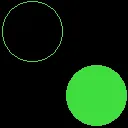 |
PROCinit SYS CT_SetGCOL%,&40dd4000 CIRCLE 64,192,60 CIRCLE FILL 192,64,60 |
The parameters are the centre coordinates and the radius, in OS units. As an aside, here’s the additive RGB triplet as used in the PhotoDesk manual, showing the complementary cyan, magenta and yellow colours. The circles are blended with the OR operation:
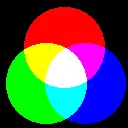 |
PROCinit SYS CT_SetGCOL%,red% CIRCLE FILL 128,160,80 SYS CT_SetGCOL%,blue%,,,,1 CIRCLE FILL 170,88,80 SYS CT_SetGCOL%,green%,,,,1 CIRCLE FILL 92,88,80 |
So, can we use these primitives to create a radial blend? Here’s a first attempt:
[Read more…]
ROCoding #1: Rectangles
Coming back to RISC OS has been interesting. I’ve had to re-learn a number of things, like using the WIMP and, in particular, graphics programming. I hope this article will be the first of a series explaining my learning curve, and hopefully providing some useful programs. It’s fairly basic — in all senses! — but does assume some familiarity with RISC OS and BBC BASIC.
We’ll start with some things you can do when drawing rectangles. While writing the Solar application I wanted to provide some better backgrounds for the graphs. A plain background is easy, of course: just use RECTANGLE FILL with some appropriate colour, like this.
 |
GCOL 0,&ff,&dd,&ff RECTANGLE FILL 0,0,256 |
…which draws a 256×256 square at the graphics origin. More generally, RECTANGLE accepts both width and height, which can be negative.
First up, we’ll generate a blend between two colours, from the bottom to the top of the rectangle. We’re assuming a full-colour display here, which is necessary for displaying blends with any fidelity. The Solar application graphs are built up by redirecting all graphics output to a sprite, then letting the Wimp handle displaying them on screen; this takes care of any mismatch between the screen and graph colour depths.
[Read more…]